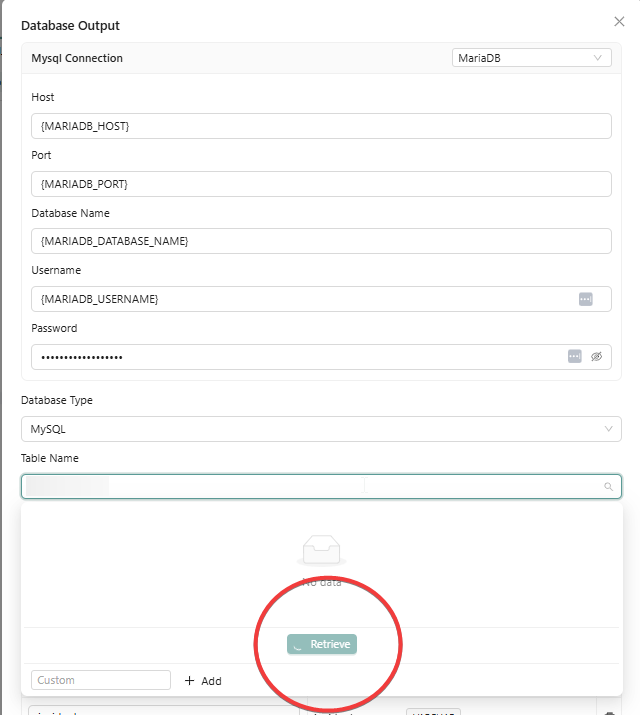
Hi there!
I’m trying to connect to a MariaDB but unfortunatly no success. Could it be a mismatch in using a DB connection?
I’m using the default MySQL connection, but keep getting errors :(.
Thanks!
Hi there!
I’m trying to connect to a MariaDB but unfortunatly no success. Could it be a mismatch in using a DB connection?
I’m using the default MySQL connection, but keep getting errors :(.
Thanks!
Thanks @harmenkuijer, what are the errors you’re getting? could you share?
Hi @Thibaut,
not errors in my console but seems that the connection can’t resolve the tables or schemes from the database, amphi keeps loading…
Looked at the network connection but my LXC container is open, reachable en can be connected from the terminal. So far that all looks good.
A deeper look makes me see this, because the use of a VARIABLE (=string)
File ~/amphi_venv/lib/python3.13/site-packages/sqlalchemy/engine/url.py:917, in _parse_url(name)
914 name = components.pop("name")
916 if components["port"]:
--> 917 components["port"] = int(components["port"])
919 return URL.create(name, **components) # type: ignore
921 else:

ValueError: invalid literal for int() with base 10: 'None'
When replacing it with the portnumber (=int), the following error is created:
(pymysql.err.OperationalError) (2003, "Can't connect to MySQL server on 'None' ([Errno -2] Name or service not known)")
(Background on this error at: https://sqlalche.me/e/20/e3q8)
Actually seems like an database connection regarding the SQLAlchemy documentation 
So; is this the correct connection string for MariaDB, while using the Database Output component:
# Connect to the MySQL database
rename1Engine = sqlalchemy.create_engine(
  f"mysql+pymysql://{MARIADB_USERNAME}:{MARIADB_PASSWORD}@{MARIADB_HOST}:{MARIADB_PORT}/{MARIADB_DATABASE_NAME}"
)
Did just a little more investigation. My Grafana LXC is finding the database in the other container with no problems.
Checked all the settings in both containers and their seems to be ok.
Anyone?
Found it! Used a @ in the password…
# Example: only '@' encoded as '%40'
Then my tailscale host was not allowed to connect so added this host to the database; problem solved!
Thanks for letting us know, that’s a good catch @simon_aubert @harmenkuijer