Hi everyone,
I’m thrilled to announce the biggest update yet for Amphi! This new release, currently in alpha due to the scale of changes, introduces many long-awaited features and improvements.
 New Scheduler
This has been one of the most requested features, and it took quite some time to get right. The first implementation aims to strike a balance between simplicity and reliability. It’s still early, so expect a few rough edges and please share your feedback!
A new icon now appears in the left sidebar:

You can add 3 types of tasks:
- Dates: one-time or recurrent
- Interval (in seconds)
- Cron
 Dynamic Components
This is a feature I’m particularly excited about! Until now, extending Amphi was only possible through Python components or by building Amphi yourself. That’s no longer the case.
You can now develop and add components directly within Amphi ETL, dynamically — no rebuild required. This is fantastic for development and opens up new possibilities for sharing components easily, without technical barriers.
Amphi components are written in TypeScript, defining both the form UI and how the Python code is generated from the inputs.
Here’s a simple example of such a component. In your workspace create a file HelloWorld.tsx and copy paste the following code. Then, in the file browser, right-click and click on “Add component”. A notification should confirm the addition of the component.
// Component file: HelloWorld.tsx

class HelloWorld extends (globalThis as any).Amphi.BaseCoreComponent {
  constructor() {
    const description = 'Takes your name and outputs a pandas DataFrame with a greeting message.';
    const defaultConfig = { name: '' };
    const form = {
      idPrefix: 'component__form_name_input_hello_df',
      fields: [
        { type: 'input', id: 'name', label: 'Your name', placeholder: 'Type your name here' }
      ]
    };
    const icon = {
      name: 'amphi-name-input-hello',
      svgstr:
        '<svg xmlns="http://www.w3.org/2000/svg" viewBox="0 0 24 24" fill="currentColor"><path d="M12 12a5 5 0 1 0 0-10 5 5 0 0 0 0 10Zm0 2c-4.33 0-8 2.17-8 5v1h16v-1c0-2.83-3.67-5-8-5Z"/></svg>'
    };

    super('Hello World', 'nameInputHello', description, 'pandas_df_input', [], 'inputs', icon, defaultConfig, form);
  }

  provideImports() {
    return ['import pandas as pd'];
  }

  generateComponentCode({ config, outputName }) {
    const name = String(config?.name ?? '').trim() || 'World';
    return `
${outputName} = pd.DataFrame([{"greeting": f"Hello ${name}!"}])
`.trim();
  }
}

export default new HelloWorld();
Then, in the canvas, if the component doesn’t show, click on the Refresh button to refresh the list of components and then look in your inputs to find the “Hello World”.
 Support for figures in console
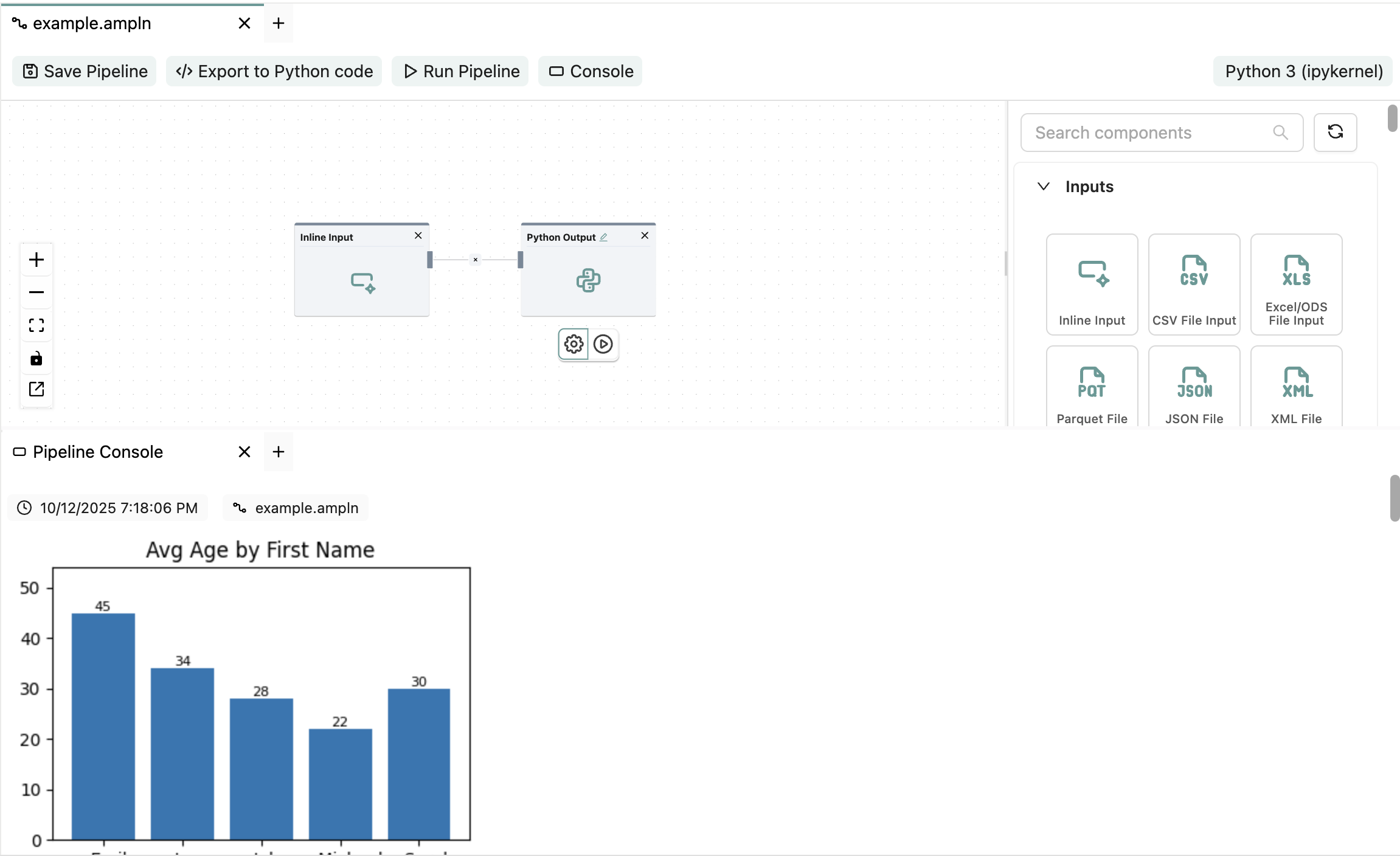
Amphi now supports displaying diagrams and figures directly in the Pipeline Console. You can output visuals from libraries like matplotlib, seaborn, and more. For now, you can test this using Python components — dedicated components will follow soon.
Here’s an example (in the Python Output with the default Inline Input):
import pandas as pd
import matplotlib.pyplot as plt

# Copy and sanitize data
df = input.copy()
df["Age"] = pd.to_numeric(df["Age"], errors="coerce")
df = df.dropna(subset=["Age"])

# Aggregate in case names repeat
plot_df = df.groupby("FirstName", as_index=False)["Age"].mean()

# Build figure
fig, ax = plt.subplots(figsize=(6, 4))
ax.bar(plot_df["FirstName"], plot_df["Age"])
ax.set_title("Average Age by First Name")
ax.set_xlabel("First Name")
ax.set_ylabel("Age")
ax.set_ylim(0, max(plot_df["Age"].max() * 1.2, 1))

# Simple value labels
for i, v in enumerate(plot_df["Age"]):
    ax.text(i, v, f"{v:.0f}", ha="center", va="bottom", fontsize=9)

plt.tight_layout()

# Required output variable
output = fig
New Components and Panel
You’ll also notice a redesigned component panel. The old list view was getting too crowded, so this new layout makes it easier to find and drag components.
In addition, several new components and improvements are included.
A huge thanks to @simon_aubert for his contributions:
-
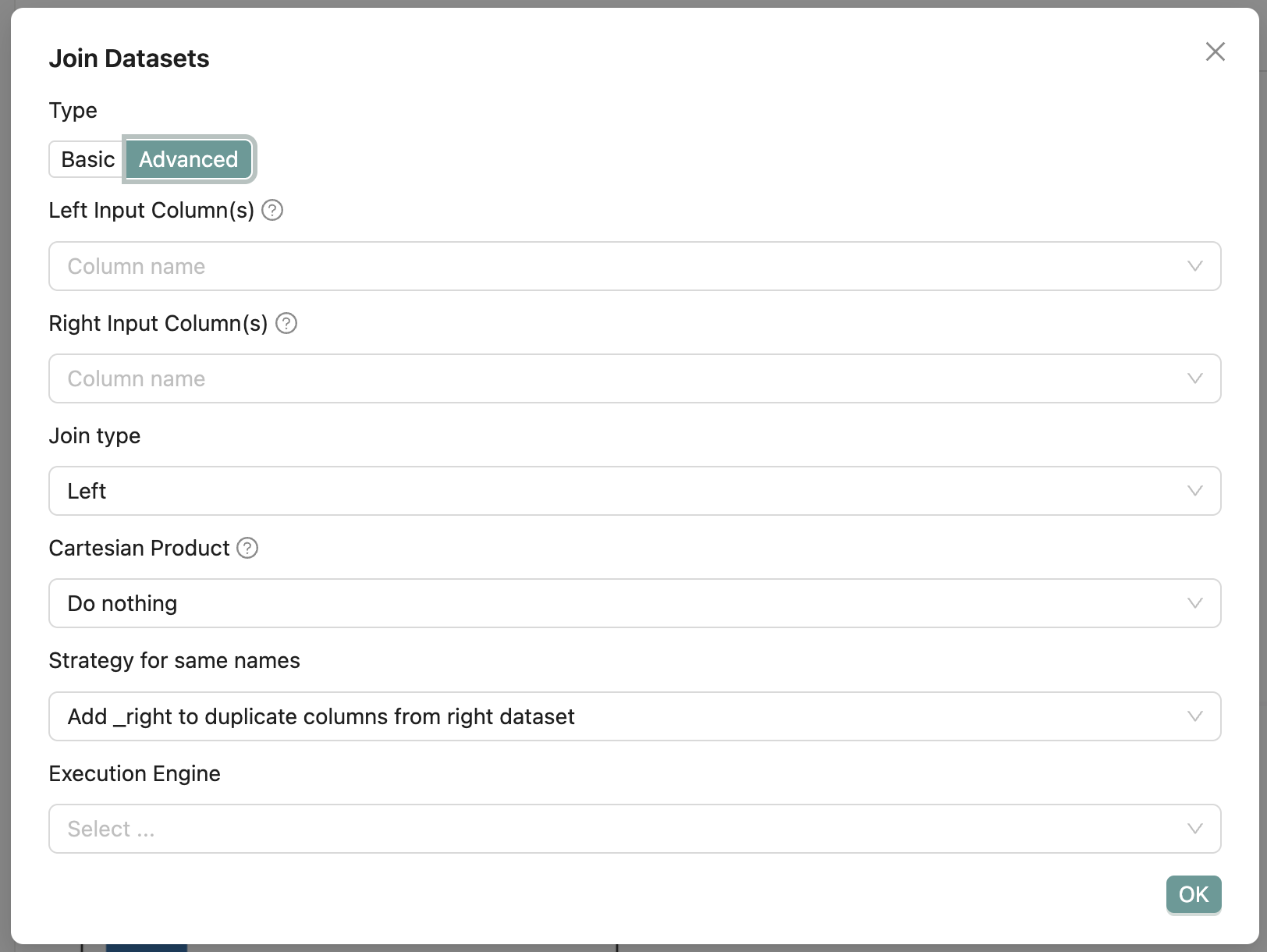
Advanced Join Options – You can now enable advanced settings like Cartesian Product computation, conflict handling for same column names, and choose between Polars or DuckDB for better performance on large datasets.
-
Compare Datasets – A new component to compare values between two datasets. Perfect for validating data migrations and ensuring data integrity.
This release also includes numerous bug fixes and minor improvements, thanks again to Simon 
This alpha is a big leap forward for Amphi. Please give it a try, share your thoughts, and help shape the next iterations!
pip install amphi-etl==0.9.0a3
amphi start